Easily Compare Two Files To Automatically Detect Errors

Run automatic side-by-side comparisons of two files and identify all differences between them

Compliance logos ISO 270001, ISO 9001, SOC 2
Document comparison interface showing differences between two text files with highlighted mismatched sections and a red error icon above.

Easily Compare Two Files To Automatically Detect Errors

Run automatic side-by-side comparisons of two files and identify all differences between them

Compliance logos ISO 270001, ISO 9001, SOC 2
Document comparison interface showing differences between two text files with highlighted mismatched sections and a red error icon above.
Trusted by 250+ Brands Globally

Comparison Software That Finds All Content Errors

Verify Comparison Software runs detailed inspections between files to ensure every error is found and corrected in your critical content
Text inspection icon
Text Compare
Compare text-heavy documents with character-to-character precision by leveraging the fastest text inspection algorithm on the market.
Spelling inspection Icon
Spell Check
Check spelling in 42 languages along with Medical and Custom Dictionaries
Graphics inspection App icon
Graphics Compare
Ensure graphics are accurate with pixel-to-pixel graphics compare

Verify’s Comparison Software Helps
You Achieve 100% Accuracy

Two teal arrows pointing left and right in opposite directions.
Compare Different File Types
Compare different file types without having to worry about file conversions. Verify ensures 100% accuracy by overlaying two files to detect even the smallest errors between the two.
Blue circular icon with a checkmark inside.
Proofread With Precision
Eliminate errors on documents, artwork, and easily isolate the areas of the file you want to check for accurate and efficient quality inspections.
Blue clipboard icon with a paper outline.
Detailed Inspection Reports
Generate comprehensive inspection reports to review and navigate through all found differences. Save and send the report for approval, and ensure necessary changes are made.

Why Verify is the Better Choice

Verify
TVT
Optical Character Recognition
Green check  mark
OCR technology built into the application to inspect non-live text
red cross mark
OCR technology unavailable—inability to inspect non-live text
Automatic Updates
Green check  mark
Automatic upgrades to leverage the latest features
red cross mark
Manual upgrades by request and dependent on computer specs
Security
Green check  mark
Cloud-based: hosted in Amazon Web Services (AWS) for top tier security
red cross mark
On-premise: RDC or CITRIX
SSO
Green check  mark
Easy authentication with Single Sign-On (SSO)
red cross mark
Active Directory—more
vulnerable and less seamless
Simple User Interface
Green check  mark
User-centric design, easy to learn and adopt right away
red cross mark
Crowded & clunky UI, not user friendly/not easy to learn

Over 250 Customers are already creating error-free content.

Ready to join them?

“GlobalVision’s software provides accuracy and minimizes the number of people reviewing documents. This saves time and allows us to commit to shorter turn-around time frames.”

pfizer logo

Jan Meyers

Global Labeling Sr. Specialist, Regulatory Affairs at BRISTOL MYERS-SQUIBB

Verify Logo

Comparison Software for 100% Content Accuracy

See How Easy Achieving Accurate Content can be with Verify’s Comparison Software
Get a Demo

Need Proofreading Software for Your Printed Assets?

Enhance the accuracy and quality of your printed materials using our market-leading proofreading software-GlobalVision Desktop (GVD)
Sign up for GVD

The File Comparison Software For Regulated Industries

Typos and recalls are impossible to avoid with manual proofreading. Embrace automation and get to market faster.

Compliance logos ISO 270001, ISO 9001, SOC 2
Verify Comparison showing text with '500 mg' highlighted next to an acetaminophen bottle label with '50 mg' highlighted in a magnified view.
Trusted by Top Brands Globally

Comparison Software That Finds All Content Errors

Verify Comparison Software runs detailed inspections between files to ensure every error is found and corrected in your critical content

Verify Text-Compare: Comparison of two text blocks showing the word 'Bitta' and 'Vitta' with a red box highlighting the letter 't' in 'Vitta'.

Text Compare

Compare text-heavy documents with character-to-character precision

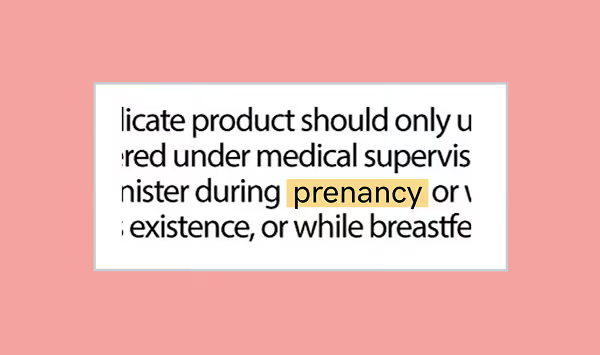
Verify Spell-Check: Text snippet highlighting the word 'pregnancy' in a medical advisory context.

Spell Check

Check spelling in 42 languages along with Medical and Custom Dictionaries

Verify Graphics-Compare: Two open squares side by side separated by a vertical line; the left square is teal and the right square is red.

Graphics Compare

Ensure graphics are accurate with pixel-to-pixel graphics compare

Verify’s Comparison Software Helps You Achieve 100% Accuracy

Two blue arrows pointing towards each other with a slight bend in the middle.

Compare Different Layouts and File Types

Compare different file types without having to worry about file conversions. Verify ensures 100% accuracy by overlaying two files to detect even the smallest errors between the two.

Icon Spacer
Blue checkmark icon inside a circular outline, indicating completion or approval.

Proofread With Precision

Eliminate errors on documents, artwork, and easily isolate the areas of the file you want to check for accurate and efficient quality inspections.

Icon of a clipboard with lines representing a checklist or notes.

Detailed Inspection Reports

Generate comprehensive inspection reports to review and navigate through all found differences. Save and send the report for approval, and ensure necessary changes are made.

✅ Verify vs ❌ TVT

Verify
TVT/Leading Market Competitor
Optical Character Recognition
OCR technology built into the application to inspect non-live text
OCR technology unavailable—inability to inspect non-live text
Automatic Updates
Automatic upgrades to leverage the latest features
Manual upgrades by request and dependent on computer specs
Security
Cloud-based: hosted in Amazon Web Services (AWS) for top tier security
On-premise: RDC or CITRIX
SSO
Easy authentication with Single Sign-On (SSO)
Active Directory—more vulnerable and less seamless
Simplified UI/UX
User-centric design, easy to learn and adopt right away
Crowded & clunky UI, not user friendly/not easy to learn

250+ Global Brands Are Already Creating Error-Free Content.

Ready to join them?

"GlobalVision’s software provides accuracy and minimizes the number of people reviewing documents. This saves time and allows us to commit to shorter turn-around time frames."
Jan Meyers
Global Labeling Sr. Specialist, Regulatory Affairs at BRISTOL MYERS-SQUIBB
Verify Icon

Comparison Software for 100% Content Accuracy

See How Easy Achieving Accurate Content can be with Verify’s Comparison Software

Need Proofreading Software for Your Printed Assets?

Enhance the accuracy and quality of your printed materials using our market-leading proofreading software - GlobalVision Desktop (GVD)