
Verify Compare’s Text Compare Software, Trusted By Regulated Industries
Spot every difference—no matter the layout—with instant character-for-character text comparison powered by our AI Inspection Engine.

“We have easily and thoroughly compared new and old carton artwork using the [Text Compare] web-based software. The interface really makes finding the differences clear and easy”


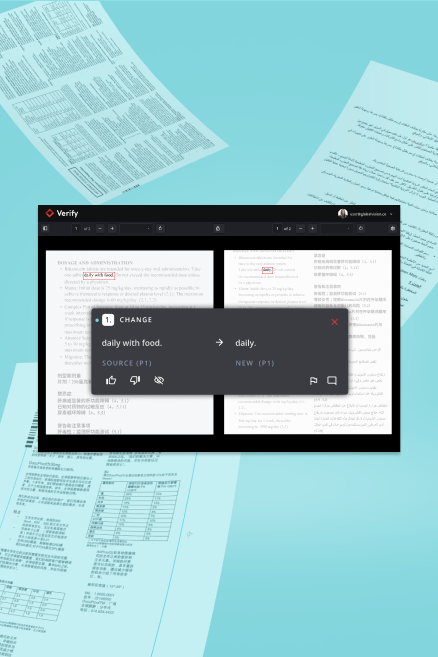
Speedy Text Comparison Software That Catches Deviations In All Languages
Have peace of mind as your documents are compared at lightning speed. Whether comparing a brief to an artwork, regulatory submissions, labeling assets, or any other documents, rely on Verify Compare’s Text Compare to get the job done right, and fast.
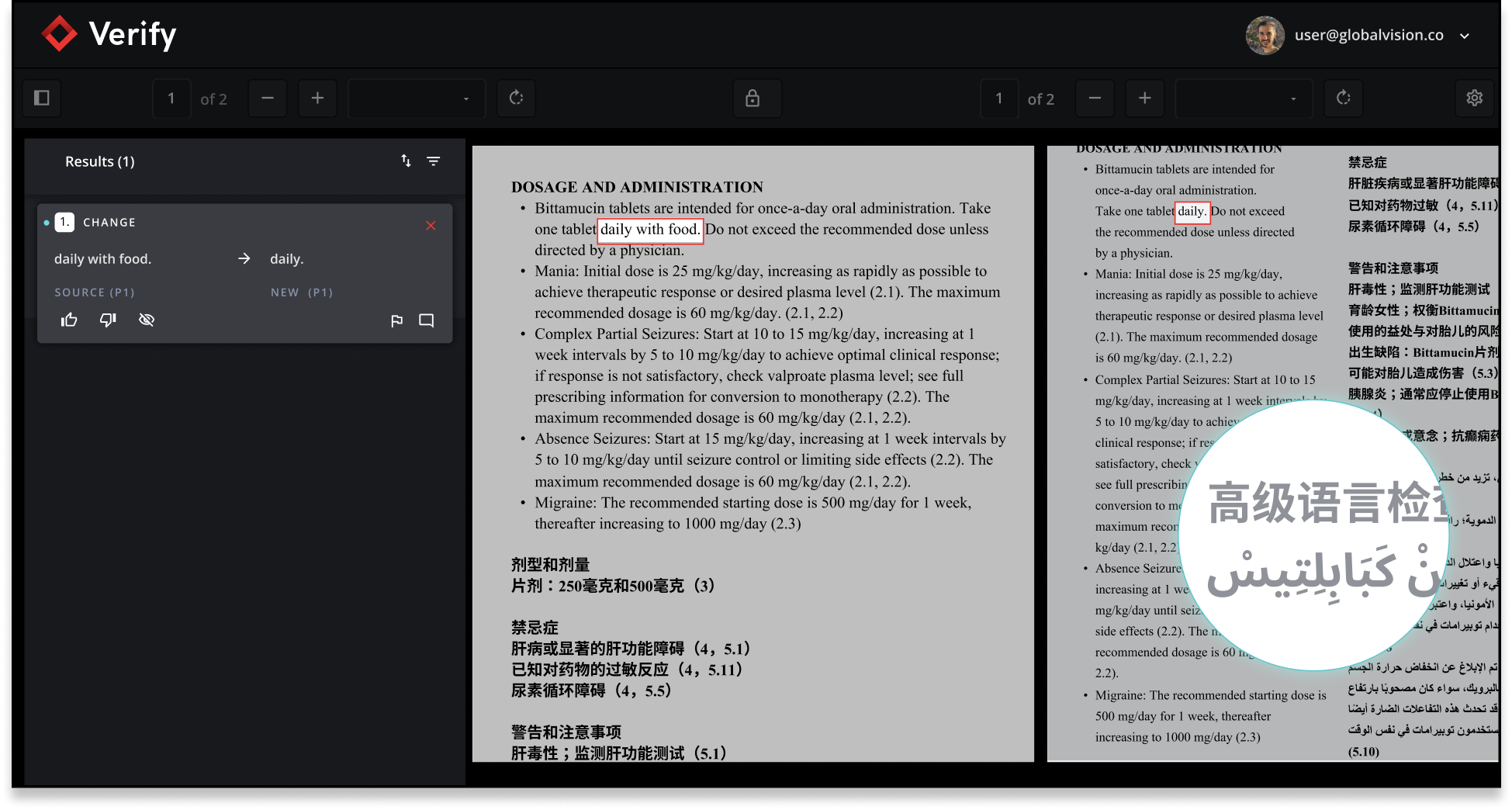
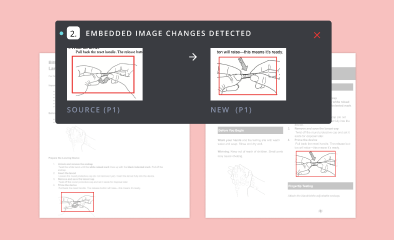
Automatic Text Comparison With Embedded Images
Effortlessly compare documents with embedded images—like pharmaceutical IFUs and promotional materials—in seconds. Instantly spot every difference in both text and visuals, so you can move forward with confidence.
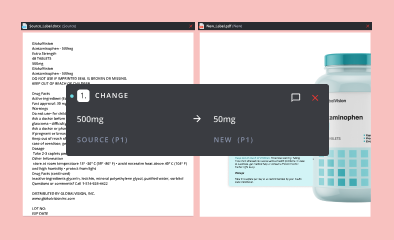
Instant Brief to Artwork Text Inspection
Manually comparing brief documents to artwork, such as raw data versus designed labels or QRD templates is a tedious challenge because of differing layouts, fonts, and content placement. Let Text Compare take over, saving you valuable time with unmatched accuracy.
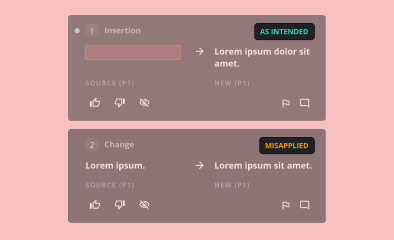
Text Verification Tool for Annotations
Powered by our AI Inspection Engine™, you can quickly verify that every intended change has been applied to your files. The software rapidly analyzes annotations against your latest version, instantly flagging which changes have been implemented and which still need attention.
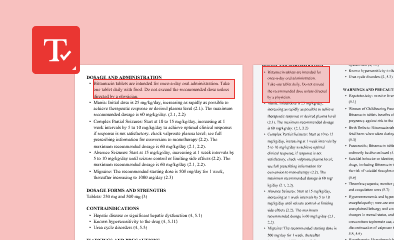
Only Compare Specific Text Zones
Zero in on what matters most. With our built-in Text Zoning tools, you can easily target and verify only the key areas of your file—cutting out the clutter and keeping your results sharp and relevant. Stay focused, move faster, and keep your momentum going.

Inspection Software That Ignores Unimportant Text
Tell the software exactly which text, like page numbers or headers, doesn’t matter for your needs using the Ignore Text tool. Cut through the noise, stay locked on what’s critical, and get your work done faster.
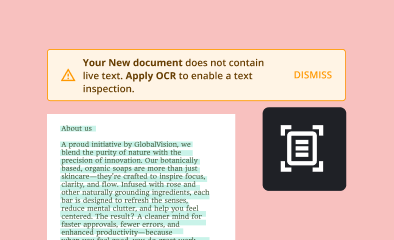
AI-Powered OCR Text Inspector
Working with files that don’t have live, editable text? Our OCR (Optical Character Recognition) feature harnesses AI to extract text with pinpoint accuracy—making it easy to compare files or run spell checks quickly and precisely.
FAQs
What is Text Compare and how does it work?
Text Compare is a powerful text verification software designed to automatically compare and Verify Compare the accuracy of documents by highlighting differences, ensuring content integrity, and streamlining proofreading processes for regulated industries.
Who can benefit from using text verification tool software like Text Compare?
Text Compare is ideal for professionals in regulated industries such as pharmaceuticals, legal, and finance, where document accuracy and compliance are critical. It helps teams save time, reduce errors, and meet regulatory requirements efficiently.
How does automated proofreading software for regulated industries improve compliance?
Automated proofreading software for regulated industries ensures that every document version is checked for discrepancies, reducing the risk of non-compliance and supporting audit trails for regulatory submissions.
Can I customize inspections in Verify Compare software for specific use cases?
Yes. Verify Compare software includes flexible tools like text zoning, ignore zones, and annotation tracking—so you can tailor inspections to your exact requirements. Whether you're verifying changes in a QRD, isolating key sections in a legal document, or comparing annotated promo copy, the software adapts to your workflow without adding manual steps.
What file formats does Text Compare support?
Text Compare supports a wide range of file formats, including:
- DOC/DOCX
- PPT/PPTX
- XLS/XLSX
- XML (new XML upload support, refer to section below for more details) - including SPL format support
- PNG
- JPG
- JPEG
- TIFF files
- ZIP files (only containing SPL documents)
- CSV
- AI (in compatibility mode)
- HTML
How does Text Compare ensure data security and confidentiality?
Text Compare uses enterprise-grade encryption and secure processing protocols to protect sensitive documents, making it a trusted text verification tool software for organizations with strict data privacy needs.
Can Text Compare integrate with other document management systems?
Yes, Text Compare offers seamless integration with popular document management and workflow systems, enabling automated document verification within your existing processes.
What are the key features of Text Compare’s automated proofreading software for regulated industries?
Key features include automated change detection, side-by-side comparison, detailed reporting, batch processing, and customizable verification rules tailored for compliance-driven environments.
Is Text Compare suitable for large-scale document verification projects?
Absolutely. Text Compare is designed to handle high volumes of documents, making it an ideal text verification software solution for enterprise and regulated industry use cases.
How does Text Compare differ from manual proofreading?
Unlike manual proofreading, Text Compare’s automated proofreading software quickly identifies even subtle differences between documents, reducing human error and significantly speeding up review cycles.
How can I get started with Text Compare?
You can request a demo or start a free trial to experience how Text Compare’s text verification tool software can streamline your document review and compliance processes.
Why did GlobalVision change the name from Verify to Verify Compare?
We renamed Verify to Verify Compare to better reflect what the product actually does — and to make it easier to understand how it fits within the GlobalVision product family. The name change is cosmetic only; the same powerful artwork and label inspection capabilities are all still there.